
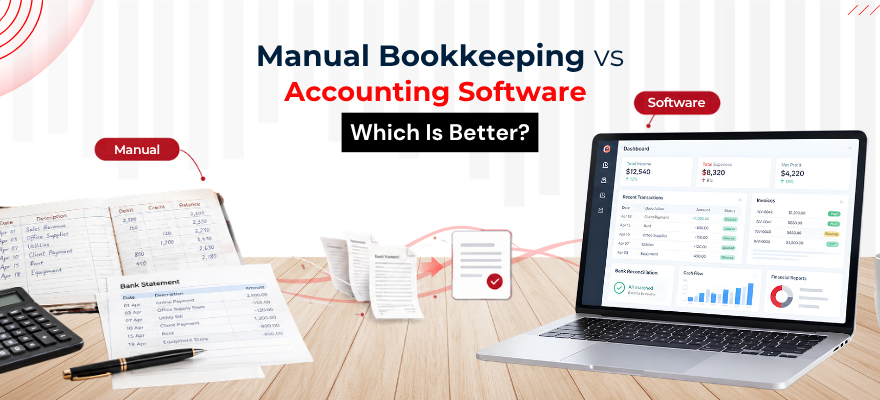


A business usually starts small. Transactions get written into a notebook, or tracked in a simple spreadsheet, and that's enough for a while. Then invoices pile up. Expenses multiply. Bank transactions come in faster than anyone can log them by hand. At some point, keeping everything on paper or in a spreadsheet stops feeling manageable.
That's the point where the real question shows up: is manual bookkeeping still practical, or does it make more sense to move to accounting software?
There's no single right answer for every business. It depends on transaction volume, how much time you have, and what you actually need from your records. Here's how the two compare.
What Is Manual Bookkeeping?
Manual bookkeeping means recording every transaction by hand, without software doing the calculations for you. It typically involves:
- Journals, or books of original entry, where transactions get recorded first
- Ledgers, where those transactions are sorted into individual accounts
- Debit and credit entries for every transaction
- Manual calculations to keep running balances accurate
- Bank reconciliation done by comparing paper or spreadsheet records against bank statements
- Financial statements prepared by pulling together all of the above
This is where most people first learn how a bookkeeping system actually works. Every number is typed or written by hand, which means every step in the process is visible. Nothing happens automatically in the background.
That visibility is exactly why a solid grasp of manual bookkeeping is worth having, even if a business eventually moves to software. Our Fundamentals of Bookkeeping and Accounting Course covers the fundamentals needed to maintain accurate bookkeeping records, whether you're working on paper or planning to move to a digital system later.
What Is Accounting Software?
Accounting software handles the same core tasks as manual bookkeeping, just through a digital system instead of a notebook or spreadsheet formula. In practice, that usually means:
- Recording transactions directly into digital accounts
- Creating and sending invoices
- Tracking expenses as they come in
- Matching bank transactions during reconciliation
- Generating reports without manually pulling numbers together
- Managing multiple accounts from one place
- Cutting down on repetitive, manual calculations
If you're comparing accounting software or looking to build your accounting knowledge alongside software skills, our Accounting courses in Singapore cover the fundamentals behind everyday accounting work.
Manual Bookkeeping vs Accounting Software: Key Differences
One thing worth being clear about: accounting software doesn't eliminate errors. It can reduce repetitive calculation and data-entry work, but choosing the wrong account, or entering a transaction incorrectly still produces inaccurate accounting records, software or not. The software speeds up the process. It doesn't replace the judgement behind it.
Advantages of Manual Bookkeeping
Simple to understand
There's nothing hidden behind an interface. Every entry is visible, and the logic behind each number is easy to trace.
No specialised software required
A notebook, a spreadsheet, or a basic ledger template is enough to get started. No subscriptions, no setup process.
Useful for learning bookkeeping fundamentals
Working through entries by hand is still one of the clearest ways to understand how debit and credit actually work and how transactions move through different accounts.
More direct control over individual entries
Every figure passes through your own hands before it's recorded, which can make it easier to spot something that looks off.
Can work for limited transaction volumes
For a very small operation with few transactions a month, a manual system can be entirely sufficient.
Limitations of Manual Bookkeeping
As transaction volume grows, the same qualities that make manual bookkeeping simple start working against it:
- More repetitive work, since every entry has to be typed or written out individually
- Greater risk of calculation mistakes, particularly with larger numbers or higher volumes
- Reporting takes longer, since figures have to be pulled together manually
- Retrieving old records can be slow, especially with paper-based systems
- Reconciliation takes more effort without automated matching
- Scaling up becomes genuinely difficult once transaction volume increases
- Everything depends on how organised the records are kept in the first place
None of this means manual bookkeeping always leads to errors. It means the workload and risk both increase as the business grows, and at some point that trade-off stops making sense.
Advantages of Accounting Software
This is where accounting software tends to earn its place, particularly for a business that's outgrown a simple spreadsheet:
- Faster transaction recording, without manual re-entry
- Automated calculations, reducing the room for arithmetic mistakes
- Built-in invoice management
- Expense tracking that updates as transactions come in
- Bank reconciliation support, often through automatic matching
- Financial reporting generated in a fraction of the manual time
- Digital record keeping that's easier to search and store
- Faster access to historical transactions when you need to look something up
Limitations of Accounting Software
A balanced comparison means being honest about the downsides too:
- There's a learning curve, especially for anyone new to the platform
- Subscription or software costs apply, which manual bookkeeping doesn't carry
- Setup takes time, from chart of accounts to opening balances
- Incorrect data still produces incorrect reports, software doesn't catch a wrong account selection
- Users still need basic accounting knowledge to use the software properly
- Features and workflows differ between platforms, so switching later isn't always simple
When Should You Move From Manual Bookkeeping to Accounting Software?
A few practical signals worth watching for:
- Transaction volume has increased to the point where manual entry eats up real time
- Multiple invoices need tracking at once, and it's getting hard to stay on top of them
- Bank reconciliation is taking longer than it should
- You need financial reports on a regular basis, not just once a year
- More than one person needs access to the records
- Digital organisation would make records easier to manage and retrieve
- Spreadsheets have started breaking down under their own complexity
If more than one of these sounds familiar, that's usually a sign the manual system has reached its limit.
Do You Need Bookkeeping Knowledge to Use Accounting Software?
Yes, basic bookkeeping knowledge is useful even when using accounting software. Software can automate calculations and generate reports, but the person entering the data still needs to understand transactions, accounts, debits and credits, expenses, income and reconciliations well enough to enter information correctly and make sense of what the reports are actually showing.
Software doesn't replace that knowledge. It just changes where the manual effort goes, from calculation to correct classification.
This is especially important for professionals from non-finance backgrounds who may need to work with invoices, expenses, financial reports or accounting systems as part of their role. Learning the basics of financial statements, the accounting equation and double-entry bookkeeping can give them the foundation needed to work more confidently with financial information and accounting software. For those looking to develop these skills in a shorter timeframe, our Accounting Course for Non-Finance Professionals provides an introduction to essential accounting concepts.
Xero, QuickBooks or MYOB: Where Does Accounting Software Fit?
Once a business decides to move away from spreadsheets, the next question is usually which platform to actually use. Most accounting software options handle the same basic tasks, recording transactions, tracking expenses, reconciling the bank, generating reports, but the workflow, interface and depth of features differ enough that the choice matters. In practice, which one a business picks often comes down to what its accountant already works with or what similar businesses in the same industry tend to use.
Xero is built around a fairly visual, straightforward workflow, which is part of why it's become a common choice for small and mid-sized businesses. Invoicing, expense tracking, bank reconciliation and financial reporting all sit within the same system, so a transaction entered once tends to flow through into reports without much extra work. Getting comfortable with how those pieces connect is really the whole learning curve, and that's exactly what our Xero Accounting Course walks through, using the platform the way it's actually used day to day rather than just covering menus in isolation.
QuickBooks takes a similar core idea and extends it further into broader financial data management, alongside transaction handling, invoicing, reconciliation and reporting. It's often the platform of choice for businesses that need slightly more depth in how their financial data is organised and reported. Our WSQ QuickBooks Training Course covers how the software is actually used in daily bookkeeping work, not just the features listed on a pricing page.
MYOB rounds out the three, and tends to appeal to businesses that want a fuller set of bookkeeping and accounting features available in one place, without needing to piece together separate tools. The core workflows, from data entry to reconciliation to reporting, follow a logic that's fairly close to Xero and QuickBooks once you're inside the system, and that's the ground our MYOB Training Course covers.
None of these platforms remove the need to actually understand what's being recorded. Pick any one of them, and the software will still ask you to choose the right account, apply the correct treatment, and check that the numbers make sense. What changes is how much of the repetitive work gets handled automatically once that understanding is in place.
For learning the fundamentals of bookkeeping, working through manual examples is genuinely useful, it shows exactly how transactions flow through accounts, in a way that's harder to see once software is doing the work for you. For managing larger volumes of real-world financial reporting, though, accounting software tends to make recording, reconciliation and reporting far more efficient.
Most businesses end up somewhere in between: they learn the fundamentals through manual bookkeeping first, then move to software once volume and complexity make that shift worthwhile.
 +65 8421 2824


 Chat With Us